Email lookup
Find connected accounts and services linked to an email address. See which platforms may list that address and open profile links in one view — ideal for digital footprint analysis and quick verification.
Investigation tools
Search emails, usernames and phone numbers to discover connected accounts, profiles and digital footprints. Enter a query below — results appear in seconds, ready to map on your investigation board.
Search Discover Visualize Connect
Search possible public dating profiles with a name, photo, username and location — then open the tool to run it.
Pick a search type, enter your query, and run.
Searching…
Please wait — do not refresh or submit again.
Three lookup types. Pick one above, run a search, and review structured results.
Find connected accounts and services linked to an email address. See which platforms may list that address and open profile links in one view — ideal for digital footprint analysis and quick verification.
Search hundreds of public platforms for a username or display name. Get a deduplicated list of possible profiles with links you can review and add to your board.
Discover publicly connected information related to a phone number. Validate the number, review carrier details when available, and use generated search links for deeper phone-based research.
Choose email, username or phone. Enter your query and select a country code for phone searches.
LinkChart scans multiple public sources and returns accounts, profiles, links and details in a clear list.
Filter hits, open profile URLs, and copy what matters. No endless tabs — everything stays in one place.
Move findings to a collaborative investigation board. Connect people, accounts and events on a realtime canvas.
Search for an email, username or phone number. LinkChart gathers open-source style results you can trust to review yourself, then organize them visually inside investigation boards built for link analysis and network analysis — not just spreadsheets of URLs.
Most lookup tools stop at a wall of links. LinkChart is built for investigators who need to see how data connects. Instead of reading through endless lists, place people, accounts, vehicles, companies and events on a realtime collaborative canvas.
Use relationship mapping to draw who knows whom, which username matches which email, and how phone numbers tie to addresses. Investigation boards sync live so your team shares one visual source of truth during OSINT investigations and research.
Open investigation boards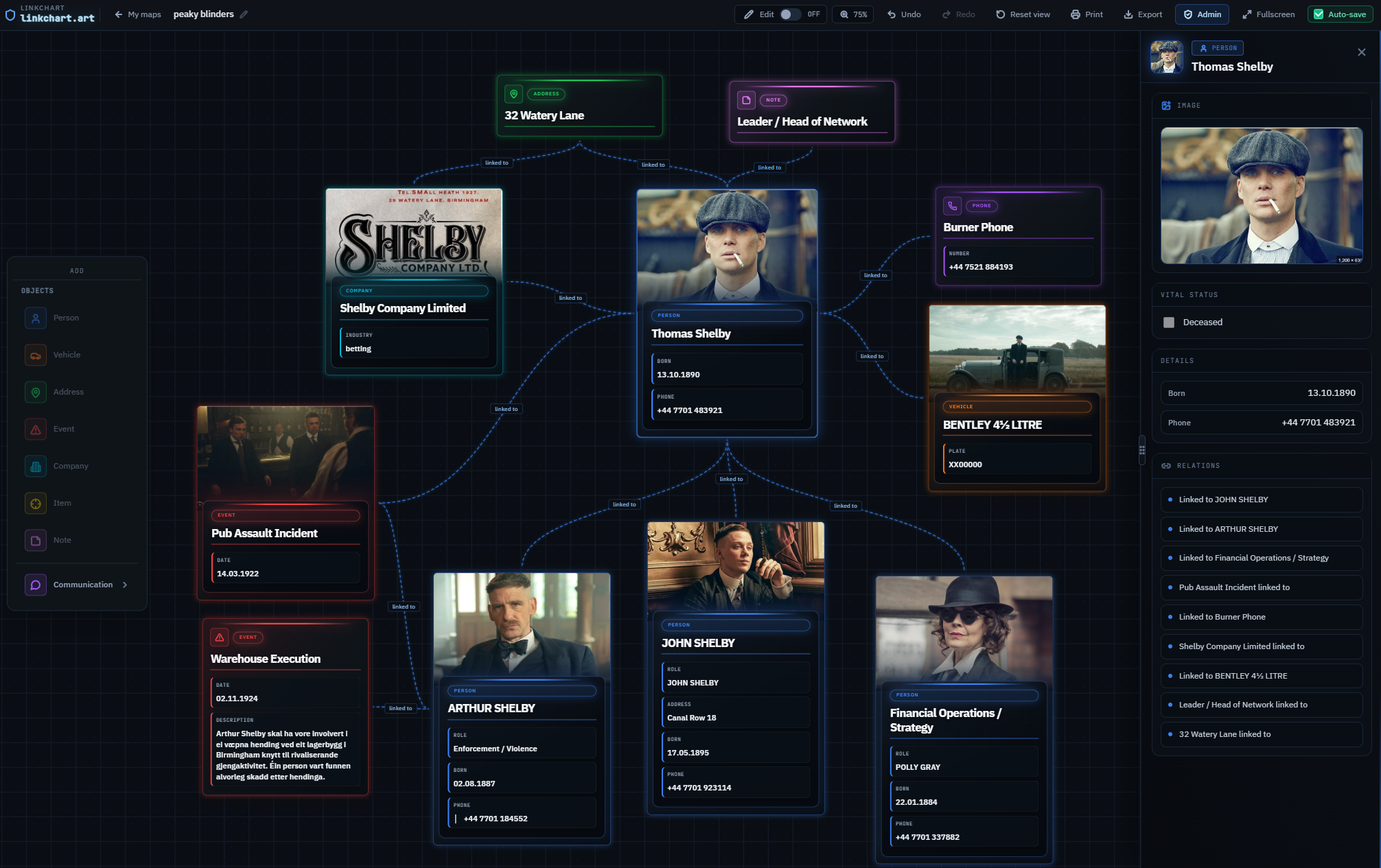
Natural workflows where email lookup, username search and visual boards work together.
Combine email lookup, username search and phone lookup in one workflow. Document sources on the board and show connections clearly for reports or team briefings.
Trace public footprints behind an address or handle. Map findings visually so editors and collaborators understand the story without digging through raw tool output.
See where an email or username appears online. Build a structured picture of someone's public presence before deeper verification or outreach.
Turn search results into a link chart: draw ties between accounts, phones, vehicles and organizations instead of losing context in separate notes.
Keep cases in one shared workspace. Add entities from lookup results, annotate links, and revisit the board as new information arrives.
Spot clusters and weak ties in a case. Visual layout makes patterns obvious — who bridges two groups, which account repeats across platforms, and what still needs checking.
Lookup tools are step one. LinkChart is built for what comes next.
Free lookup tools at the top of the page. Minimal friction when you need a fast pivot.
Profiles, links and details presented clearly so you can review, verify and act immediately.
Move from lists to investigation boards and link analysis when you need clarity, not more tabs.
Realtime collaboration keeps teams aligned on what's confirmed, what's pending and what to do next.
Clear answers for users and search engines.
An email lookup tool checks whether an email address is associated with public services or profiles. On LinkChart you enter an address, run a search, and receive a list of possible account links to review — a practical way to find accounts by email.
You enter a username without the @ symbol. The tool searches many public platforms for matching handles and returns profile URLs where found. Use results to build a digital footprint picture or add profiles to your investigation board.
Phone lookup validates format and country, shows carrier or region data when available, and provides curated public search links. It helps you start phone-based research — not private call logs or message content.
Relationship mapping is drawing how entities connect: people, usernames, emails, phones, companies and events. LinkChart's canvas lets you link nodes visually instead of tracking connections only in text notes.
Yes. Investigation boards support realtime collaboration. Teammates can edit the same link chart, add entities from lookup results, and see updates as the case develops — useful for distributed OSINT and research teams.
A link chart is a diagram of connections in an investigation. LinkChart combines lookup tools with a visual board so you move from “what did we find?” to “how does it all connect?” on one platform.
No. Pick a search type, enter a query, and press Run. Results are listed clearly. When you need more depth, open the app to map connections — no command line required on this page.
Many tools end at text output. LinkChart adds visual investigation boards, link analysis and live collaboration so search results become a structured, shareable case — not a forgotten browser tab.
A practical guide to digital footprint discovery and why structured results matter.
Open-source intelligence (OSINT) is the process of collecting, verifying and organizing information from public sources. In modern investigations, the first challenge is rarely “is there data?” — it is “how do we find the right signals quickly, and how do we connect them without losing context?” That is why lookup workflows like email lookup, username search and phone lookup remain foundational. They give you a starting point to discover connected accounts and public profiles, and they help you build a defensible path from a single identifier to a structured view of a person's online presence.
LinkChart is designed to make this workflow fast and understandable. You run a search, review results yourself, and then move from “a list of links” to relationship mapping and link analysis on a visual investigation board. That shift matters in real cases: lists are easy to collect, but connections are hard to remember. When your findings live in a link chart you can explain what you found, where you found it, and how you concluded two accounts belong together.
An email address is one of the most useful OSINT pivots because it is often reused across services. An email lookup tool helps you identify where an address appears publicly or where a site indicates that an email can be used for sign-in or account recovery. The goal is not to “prove” ownership automatically — it is to surface a set of candidate platforms and profile links you can verify using context. In practical terms, email lookup supports: (1) finding connected accounts, (2) discovering profile URLs, (3) confirming whether two identities are likely related, and (4) building a timeline of activity based on platform presence.
In LinkChart tools, you enter an email address and receive structured results you can filter, open and document. For example, if an address appears on multiple services, you can add those services as nodes on an investigation board and connect them to a “Subject” entity. This is where OSINT becomes more than searching: you can annotate which links are confirmed, which are speculative, and what evidence supports each connection. That makes collaboration easier and reduces rework when a case returns weeks later.
A good email lookup workflow also reduces false positives. Many services will show “account exists” style signals that are not proof of ownership. Treat lookup results as leads, then validate using independent evidence: consistent usernames, repeated profile links, matching photos, overlapping locations, or public posts that cross-reference the same identity. This is the difference between “I found a link” and “I can justify a connection” — a critical OSINT skill.
A username search (sometimes called username lookup) checks whether a handle exists across many platforms. Usernames are especially valuable when a target uses consistent naming patterns, or when a single handle is linked to public posts, profile bios, photos or contact details. A strong username search workflow does two things: it finds candidate profiles, and it helps you evaluate whether they belong to the same person. This is why structured results matter: you want fast access to profile URLs, but also a way to record why you believe two profiles match (shared avatar, same bio, repeated links, matching location, etc.).
In LinkChart, run a username search and review the “Found” results first. Open each profile in a new tab, check for corroborating details, and then bring confirmed profiles into your board as nodes. From there, you can connect profiles to emails, phone numbers, locations or organizations. This is a simple form of network analysis: you are mapping a set of identities and their relationships so patterns become visible. When multiple investigators work together, a shared board becomes the fastest way to keep alignment on what is confirmed, what is pending, and what should be checked next.
Username search is also useful for relationship mapping even when a profile is not confirmed. If the same handle appears on multiple platforms, you can model it as a hypothesis node (“Handle: johndoe”) and connect candidate profiles to it. Later, as you verify, you promote those connections to confirmed. This keeps your investigation board honest: it separates “possible” from “proven” while still preserving the path you took.
Phone-based OSINT often begins with a number found in a message, a listing or a contact card. A phone lookup workflow should start with normalization: select the correct country code, validate the format, and then gather publicly available context such as carrier information where available. From there, the most reliable next step is usually search: generate targeted queries and look for the number on public pages, marketplaces, directories and social posts.
LinkChart's phone lookup requires selecting a country code so the number is parsed correctly. The results show a clean summary (E.164 format, country, region/carrier when available) and provide grouped search links. This is useful because phone numbers are frequently written in many formats, and a good OSINT workflow tests multiple variations. When you find a phone number linked to a username or a listing, bring that into your investigation board and connect it to the relevant entity. Over time, your board becomes a living map of connections — which phone appears with which profiles, which handles repeat across platforms, and which data points are independent corroboration.
Phone numbers can be sensitive, and OSINT work should stay lawful and ethical. LinkChart is designed for public discovery: it helps you organize what is already available on the open web and supports documentation. It does not provide private communications. Use phone lookup to find public postings, directory entries and cross-references, then verify using multiple sources before drawing conclusions.
Example: Email lookup
Search name@example.com. You might find profile links on a few services, rate-limited checks on
others, and “not found” results where no public signal exists. Confirm by opening the returned profile URLs
and looking for consistent identity details (bio links, avatar reuse, location hints).
Example: Username search
Search johndoe. You might see matches across several platforms. Validate by checking whether those
profiles link to the same website, show the same face or use identical phrasing. Then connect confirmed profiles
to a single subject node on your investigation board.
Example: Phone lookup
Select a country code and search a national number. The tool returns normalized format and grouped search links. Use those links to find public listings or posts. If a phone number appears on a marketplace listing with a username, connect them and keep the source URL attached for traceability.
OSINT is effective when it is repeatable and explainable. Quick lookups help you move from a single clue to a set of leads without guessing. But the real value comes from organization: keeping sources together, tracking confirmation status, and preserving context for other analysts. This is where LinkChart's approach helps: search results are not the end of the workflow. You can map them into a visual case view using relationship mapping, link analysis and realtime collaboration.
If you are new to OSINT, start simple: run one email lookup, one username search, and one phone lookup for the same subject (when you have lawful basis and a legitimate purpose). Compare what overlaps. Then visualize the overlap on a board: connect the email to confirmed profiles, connect the username to matching accounts, and link any phone-based findings that are publicly corroborated. This “Search → Discover → Visualize → Connect” loop is how raw data becomes investigative clarity.
For teams, the advantage is speed and trust. A shared investigation board becomes a single source of truth for relationship mapping: who added which source, which link was verified, and what remains uncertain. That improves handover between analysts and reduces duplicated searching. It also supports better reporting: instead of pasting a list of URLs, you can present a coherent network view and explain the links with context.
Finally, remember that OSINT is not about collecting everything. It is about collecting what is relevant, keeping it organized, and being honest about confidence. Email lookup, username search and phone lookup are powerful because they are simple pivots that often uncover connected accounts and digital footprints. LinkChart adds the missing piece: a visual mapping workflow that turns findings into a clear, collaborative picture of a case.
Note: LinkChart surfaces publicly available search results and links. Always verify results, follow applicable laws and organizational policy, and avoid treating unconfirmed matches as facts.
Run a search above, then open the app to build your investigation board.
Your search is ready
Start free trial to unlock full results — cancel anytime.
Then $19/week · Cancel anytime.
Free
Free trial
Unlimited search included
Then $19/week · Cancel anytime
Please confirm the billing details to continue.
Billed securely by LinkChart via Stripe. See billing details for full pricing.
Secure payment · Link, Apple Pay & card
Preparing secure payment…
Confirm billing details to unlock payment.
Report ready
Your free trial is ready. Create an account to open every profile URL.
Opening your result…