
Email lookup
Reveal accounts and digital traces tied to an address, then pin the useful ones beside the person card.
linkchart linkchart.art
A persistent investigation canvas — plus email, username and phone lookup tools that feed the board. Register once. Keep the network.
Pillar 01 · Canvas
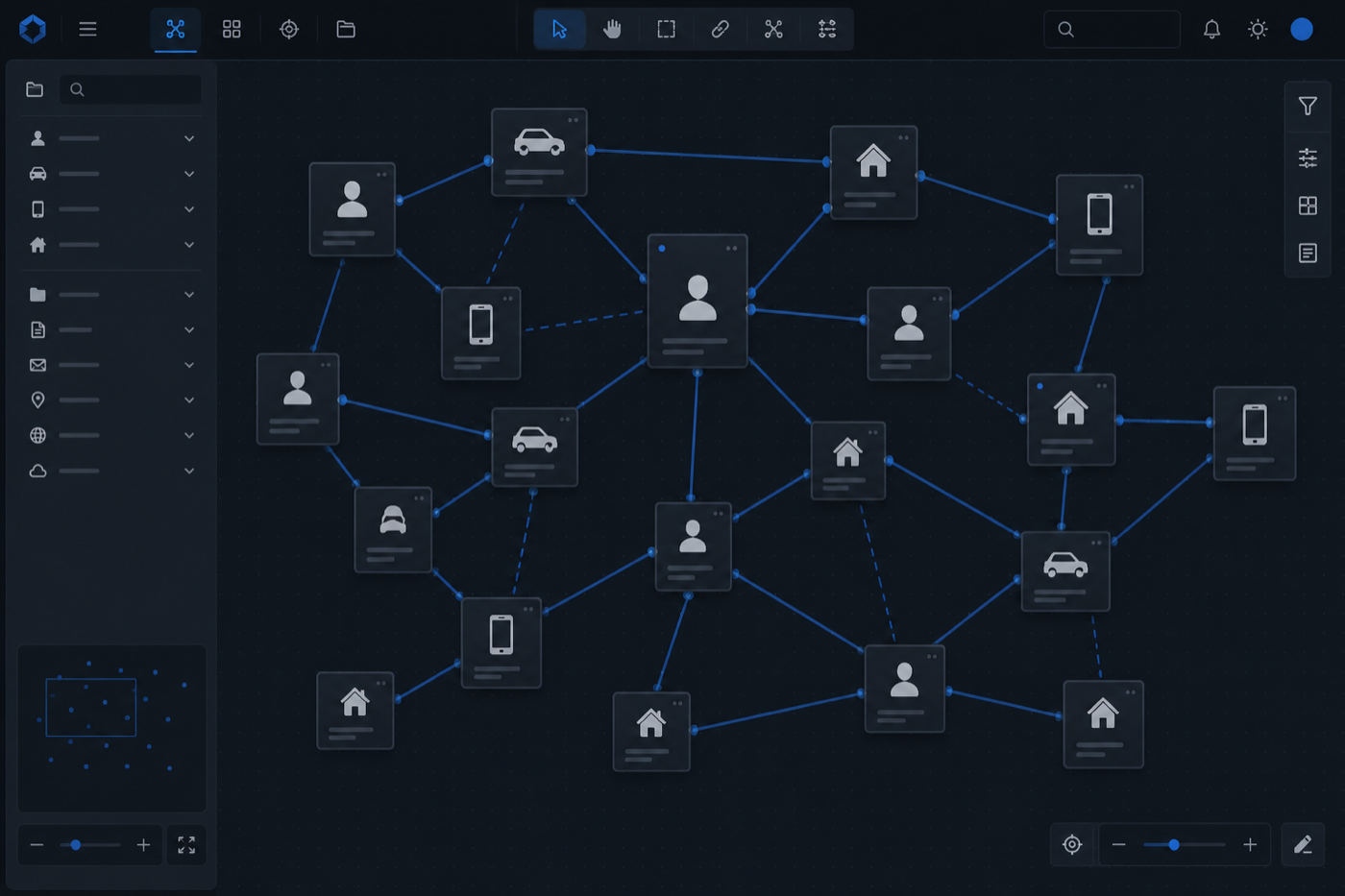
An account unlocks the full investigation board: entity cards, labelled relationships, notes, images and layouts that survive the night. Build organised-crime webs, fraud trees, missing-person contact maps or due-diligence ownership charts without starting from a blank slide every Monday.
Pillar 02 · Tools
Canvas without discovery is just drawing. With an account you also get the identifier tools: email lookup, username search and phone lookup. Find public footprints, then place what you can defend onto the board as entities and relationships.

Use each tool as a lead engine — then promote solid hits into canvas cards so the team sees the network, not a browser history.
Reveal accounts and digital traces tied to an address, then pin the useful ones beside the person card.
Chase a handle across platforms when the same alias keeps surfacing in chats, forums or profiles.
Check a number against public signals and connect the handset story back into the wider network.
Continuity features that make a free registration feel like infrastructure, not a newsletter signup.
Keep fraud, missing persons, due diligence and side projects in separate boards without mixing hypotheses.
Return to the exact layout and notes you left — even weeks later.
Share boards when a second analyst needs the same picture.
Print clean network views for meetings and partner updates.
Move from identifier search into structured mapping without changing products.
Creating an account at linkchart.art is not a soft gate that only saves a bookmark. It is the switch that turns a curious visitor into someone who can own investigation work: persistent canvases, structured entity cards, labelled relationships, lookup tools for email, username and phone, collaboration options, and a workflow that survives overnight, shift changes and the messy middle of a real case. This page explains what you get — in plain language — so you can decide whether registering is worth five minutes of your time.
Most investigation software either overpromises a platform or underdelivers a blank diagram. linkchart sits in the useful middle: a browser canvas built for link charts and network analysis, paired with practical OSINT-style lookup tools that help you find identifiers before you place them on the board. With an account, those pieces stop being demos and become your working kit.
The first thing an account gives you is a personal workspace of maps. Each map is an infinite canvas where people, vehicles, addresses, phones, companies, events and digital profiles appear as cards. You drag them into a layout that matches how the case thinks — not how a slide template forces you to think. Relationship lines carry meaning: owns, seen at, uses, employed by, communicated with, or the custom labels your unit prefers.
Without an account, a diagram is temporary theatre. With an account, the canvas becomes a living case artefact. Auto-save keeps layout and notes as the inquiry develops. You can leave a map for days and return to the same network without rebuilding from screenshots. That alone changes how investigators brief, hand over and challenge hypotheses: the picture and the facts stay in one place.
Account maps are not decorative nodes. Cards hold structured fields — plates, carriers, usernames, organisation numbers, dates — plus free-text notes and optional images. Colour-coded entity types help a supervisor scan a dense chart in seconds. When a new associate appears, you add a card and a labelled link instead of redrawing a PowerPoint wall. When a theory collapses, you rearrange without losing the underlying documentation.
This is the difference between “we drew a network once” and “we maintain a network.” Account holders get the latter. Print-ready export means the same board that helped you think can also help you present: meetings, partner agencies and case conferences get a clear diagram instead of a vague verbal map.
A link chart is only as good as the identifiers you put on it. That is why a linkchart account also opens the door to the email lookup, username search and phone lookup tools. These are not separate toys in another tab — they are the discovery layer that turns a thin lead into mappable entities.
Start with an email and discover connected accounts and digital footprints worth verifying. Trace a username across platforms when aliases keep reappearing. Check a phone number against public signals that may connect a handset to people, services or other identifiers. Then move verified hits onto the canvas as cards with relationships, rather than leaving them as a pile of browser tabs you will forget by Friday.
The account workflow is deliberately simple. You search, you evaluate what is public and useful, you place entities on the board, and you connect them with labelled links. Guests can explore tools in a limited way; registered users get a workspace that remembers progress and a path into maps that persist. Pricing and credits cover deeper lookup volume when you need it — but the core idea stays the same: tools find signals, the canvas makes meaning.
Investigators who already live in OSINT tools often lose the middle step: they find excellent identifiers and then dump them into notes apps or chat threads. An account closes that gap. Your lookups and your link chart finally share a product surface, which is why linkchart.art is useful for fraud teams, private investigators, analysts and anyone mapping relationships under time pressure.
Cases rarely belong to one person for their whole life. An account lets you keep maps in a place your future self — or a colleague with access — can open without archaeology. Sharing and role options help when a board needs a second pair of eyes. Continuity matters as much as features: the best chart is the one that is still accurate next week.
You also get a clearer boundary between public browsing and private work. Your maps live under your login. You decide when a board is ready to show. You can keep working hypotheses off the wall until they harden. That control is part of what having an account means in practice — not just a password, but a perimeter for unfinished thinking.
If you only need a one-off curiosity search, you may not need an account today. If you are building anything that must survive more than one session — a fraud web, a missing-person contact tree, an organised-crime association chart, a due-diligence ownership map, an OSINT account cluster — registration pays for itself the first time you would otherwise rebuild the picture.
Detectives and analysts use accounts to keep operational maps current. Private investigators use them to show clients a coherent network instead of a folder of PDFs. Researchers and journalists use them to keep source relationships honest and inspectable. Corporate investigators use them when counterparties, vendors and shell entities multiply faster than a spreadsheet can stay readable.
linkchart is not a records-management system and does not replace lawful evidence processes. It is the visual intelligence layer: the map on the wall that updates when the case updates. An account is how that wall becomes yours.
Many products sell either a drawing board or a search box. Investigators do not work that way. A lead arrives as a phone number; the next hour produces a username; the next day produces an email tied to a company mailbox. If those identifiers never land on a shared map, the team keeps rediscovering the same connections in different tools. An account on linkchart.art is designed to interrupt that loop. Lookups generate candidates. The canvas forces you to state the relationship. Notes capture uncertainty. Labels stop anonymous arrows from pretending to be evidence.
Over a long inquiry, that discipline compounds. New officers can read the board without a twenty minute oral history. Supervisors can challenge weak links visually. Partner agencies can receive a print that still makes sense without your laptop. The account is the continuity layer that makes those handovers possible. It is also the reason we talk about what you get instead of what you can click once: the value is not a single feature demo, it is a repeatable investigation habit built around a living link chart and the identifier tools that keep feeding it.
An account does not magically create classified data, closed databases or guaranteed matches. Lookup tools work with publicly available signals and the coverage those sources provide. You still verify. You still respect law, policy and ethics. You still keep sensitive material inside your organisation’s approved channels when rules require it. What the account provides is speed and structure for the open, messy middle of mapping — the part where people lose hours to tabs, screenshots and forgotten spreadsheets.
Credits and paid plans exist when your lookup volume grows. The free path is there so you can prove the workflow on a real case before you scale. That honesty matters: the best reason to register is not a marketing checklist, it is the moment you realise you need the board to still exist tomorrow morning with every labelled relationship intact.
Morning: you open yesterday’s map and see the associate cluster you built after a late interview. Midday: a new email appears in a report; you run email lookup, confirm a useful public footprint, and add a digital-profile card linked to the person node. Afternoon: a colleague reviews the board, spots a missing vehicle link, and you fix the relationship label before the briefing. Evening: you export a clean view for the case conference. None of that requires reinstalling software or rebuilding a chart from photos of a whiteboard. That is the quiet power of having an account.
If your work is occasional and shallow, bookmark Tools and move on. If your work is cumulative — if relationships are the actual subject of the investigation — then the account is the product. Canvas. Tools. Continuity. That is what you get with linkchart.art, and that is why registering is the difference between touring a product and owning a working investigation surface.
Register at app.html, create your first map, and place the entities you already know. Run an email, username or phone lookup when you need fresh identifiers. Link what you can defend. Leave the board open as the case breathes. That is the whole promise of a linkchart.art account: canvas plus tools, in one place, ready when the next fact arrives.
If you want the product story in more depth, read the product guide. If you want sector examples, browse use cases. If you want to start discovering identifiers immediately, open Tools. And if you are ready to keep the work, create the account — that is when linkchart stops being a tour and starts being infrastructure.
Yes. Create a free account to save maps and use the core canvas. Deeper lookup volume may use a free allowance or paid credits — see Pricing.
Yes. Account access connects the lookup tools to a workspace that can keep results useful as map entities, not disposable tab clutter.
Yes — the investigation canvas is the heart of the account: persistent link charts with cards, labelled relationships, notes and export.
Investigators, analysts, private investigators, fraud teams, researchers and anyone who needs relationship maps that outlive a single session.
Create your free linkchart.art account and unlock the canvas plus the lookup tools that feed it.